Card Tokenization Overview
CARTÃO PROTEGIDO (card tokenization) is a safe credit card information storage platform. The data stored at the Protected Card Platform follows PCI standards that ensure the integrity of the card information stored.
The CARTÃO PROTEGIDO (card tokenization) integrates with gateway PAGADOR (BRASPAG), facilitating the submission and processing of credit card transactions via token.
ABOUT THE PRODUCT
While product, CARTÃO PROTEGIDO (card tokenization), as a solution to the problem of secure data storage of credit card can be used for various purposes such as:
- 1 Click Shop: “1 Click Shop” allows an online payment (via credit card) be made skipping the step of filling in the payment details or even the whole process of the shopping cart, since card data were previously reported by the buyer in past purchases and will be replicated in future purchases through its authorization.
- Recurrent Billing: Establishments that already have an internal solution for managing recurrences can use the platform just to the sensitive part: storing data and credit card processing via PAGADOR, charges in Acquirers by using only the token.
- Retry sending transaction (sale): For establishments that store data sale to pass in a second time, and to re-try sending a credit card transaction for a Purchaser or to any internal procedure before authorizing the sale (inventory validation, analysis of fraud), the platform perfectly serves this purpose. The establishment needs to understand and manipulate just one token, remaining adherent to the security rules of the industry of credit cards.
- Or for any other purpose, which is necessary to store data from a credit card safely, even temporarily.
The “One Click Shop” enables online payments via credit card skipping the step of filling out payment details or even the whole shopping basket process, since all card details have previously been informed by the purchaser on past purchases and will be automatically replicated in new purchases upon the purchaser’s authorization.
ABOUT THIS MANUAL
This manual aims to guide the Merchant’s developer on the integration with the CARTÃO PROTEGIDO platform, describing existing functions and methods to be used, listing information to be sent and received, and providing examples.
integration Guide
Please see the graphics for the sales process flows in the sections below. There are 3 ways to integrate the product:
- Directly via CARTÃO PROTEGIDO platform
- Via PAGADOR platform - through Web services.
- Via PAGADOR platform - through Data Posts.
The following data is required to store a credit card in the platform: Customer’s CPF (Taxpayer ID), Customer’s Name, Cardholder’s Name, Card Number, and Expiration Date. The security code is not stored (please refer to the Security Code section
PARAMETER JustClickAlias
This parameter is intended to facilitate the storage, by the customer, of information related to a Secured Card The customer may at the time of the rescue card, create an alias (name) will identify the card in Platform CARTÃO PROTEGIDO.
Another advantage is the fact that this alias can be associated with a new JustClickKey, which facilitates the exchange of a card when, for example, its validity expires.
Para isso, o lojista deveria indicar que o JustClickKey está desabilitado. Dessa forma, o Alias associado a ele ficaria liberado para ser utilizado com um novo JustClickKey.
Right Way of Association
An Alias can be associated with a new token, since before being disassociated from the old Token as shown in the example below:
| Merchant Id | JustClickKey (Token) | Alias | Enabled |
|---|---|---|---|
| LOJA A | Token 1 | XPTO | 0 |
| LOJA A | Token 2 | XPTO | 0 |
| LOJA A | Token 3 | XPTO | 1 |
Form not accepted of Association
An Alias can be associated with a new token, since before being disassociated Token old, in the example below is shown a way that would not allow this association because the Alias will only be released to a new association that is disconnected from a particular Token:
| Merchant Id | JustClickKey (Token) | Alias | Enabled |
|---|---|---|---|
| LOJA A | Token 1 | XPTO | 1 |
| LOJA A | Token 2 | XPTO | 1 |
| LOJA A | Token 3 | XPTO | 1 |
AUTHORIZATION PROCESS VIA CARTÃO PROTEGIDO PLATFORM
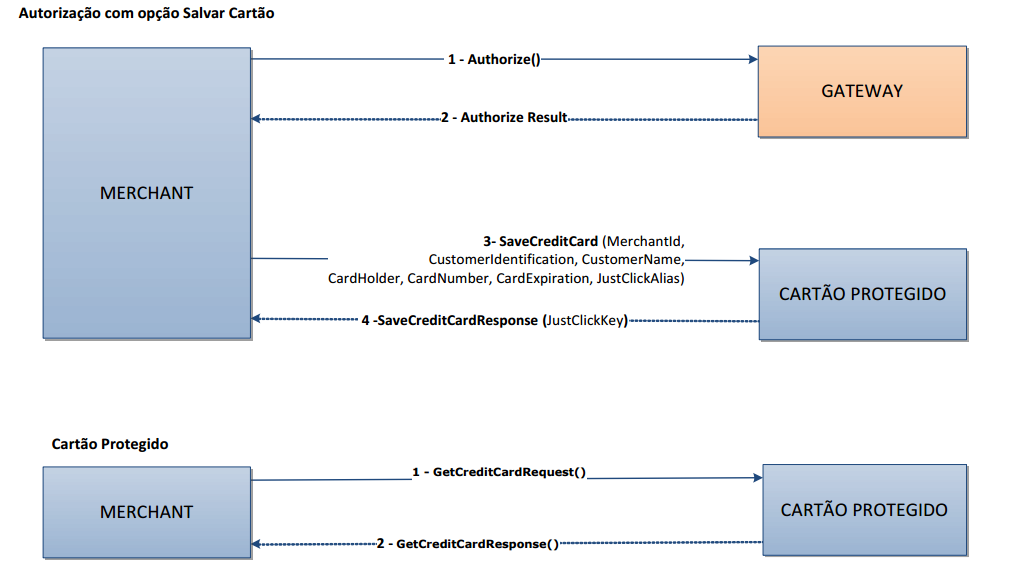
Below is the process of request for saving customer card details during a sale transaction, followed by another process in which the same customer makes a purchase via CARTÃO PROTEGIDO
After having the customer’s permission to save his/her card details, the merchant should:
- Submit the purchase authorization request via Gateway. Standard process already adopted today
- Receive the authorization result
- Submit the card details for storage in the CARTÃO PROTEGIDO (PROTECTED CARD) platform
- Receive and store the “JustClickKey”, which is the key representing the pair “credit card-customer” for future “One Click Shops”.
When the customer returns to the site for a new purchase and logs in, the site can offer the “One Click Shop” option and the flow will be:
- To invoke the transaction authorization directly from the CARTÃO PROTEGIDO platform, passing the customer’s “JustClickKey” and, optionally, the CVV (please refer to the Security Code section)
- Receive the authorization result
AUTHORIZATION PROCESS VIA PAGADOR
Below are the processes of request for saving a customer card during a sale transaction and a purchase via CARTÃO PROTEGIDO (PROTECTED CARD) platform, both using the PAGADOR/CARTÃO PROTEGIDO integration
AUTHORIZATION WITH THE OPTION TO SAVE CARD DETAILS
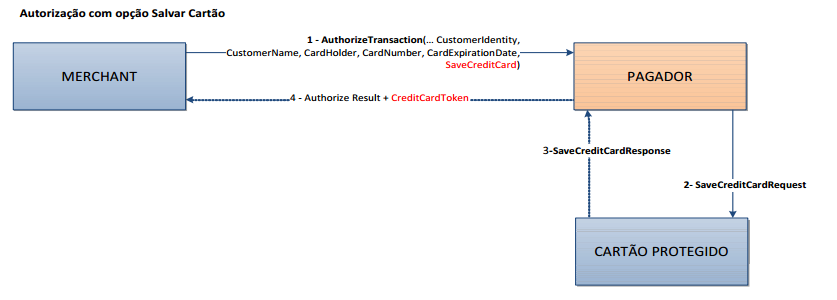
- Submit the purchase authorization request via PAGADOR with the SaveCreditCard parameter;
- PAGADOR submits the credit card details to the CARTÃO PROTEGIDO (PROTECTED CARD) platform for storage;
- CARTÃO PROTEGIDO platform submits the card details storage response to PAGADOR;
- As a result, PAGADOR submits the authorization and storage response to the customer;
AUTHORIZATION VIA PREVIOUSLY SAVED CARD
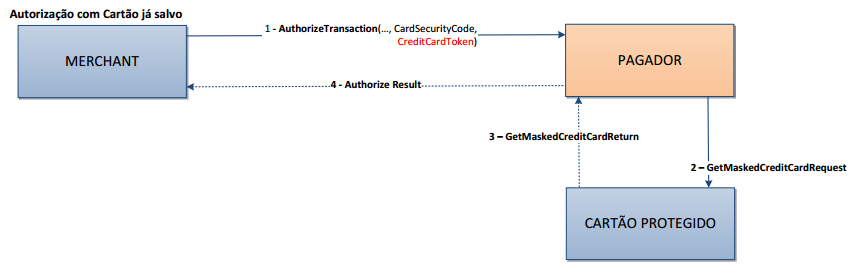
- Submit the purchase authorization request via PAGADOR with the CredicardToken parameter;
- PAGADOR submits the credit card details to the CARTÃO PROTEGIDO (PROTECTED CARD) platform for retrieval of previously saved card details;
- CARTÃO PROTEGIDO (PROTECTED CARD) platform submits the card details response to PAGADOR;
- As a result, PAGADOR submits the authorization response to the customer;
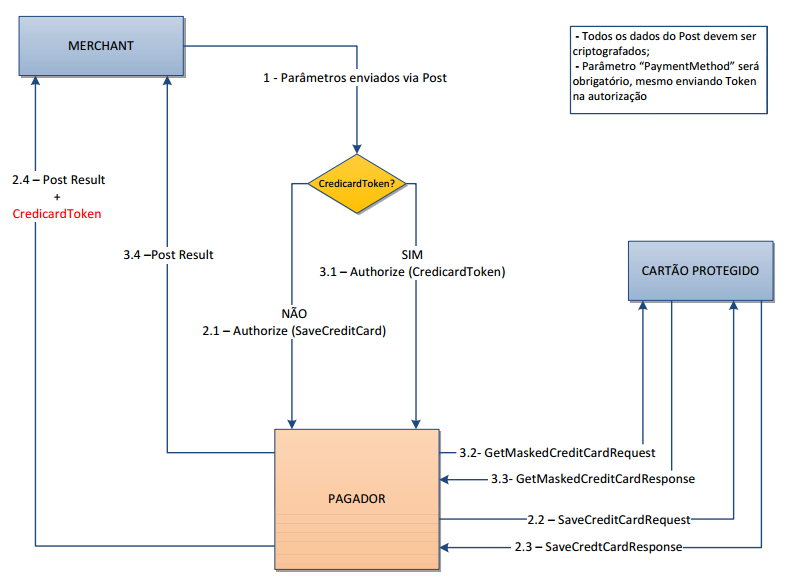
AUTHORIZATION VIA POST
Below is the process of authorization via Post. Showing a transaction where the customer has the key generated by the CARTÃO PROTEGIDO (PROTECTED CARD) platform, and another transaction where this key is still to be generated and sent to the customer (CredicardToken).
SECURITY CODE (CVV)
The security code is required to enable the authorization of a remote purchase to be accepted by the bank issuing the card. It is another security mechanism in the antifraud process that seeks to confirm that the person who is using a card is unmistakably the cardholder. Therefore, the card industry regulations (PCI) allow the storage of the card’s number and expiration date, but never the security code. This code should always be requested at the time of purchase, for validation. As BRASPAG is a PCI-compliant company, it does not store the security code, which will have to be requested by the merchant upon sales confirmation via CARTÃO PROTEGIDO (PROTECTED CARD).
However, the issuing banks and credit card operators can eliminate the obligation of security code to affiliations of merchants that have a business model based on recurrence, such as Service Subscriptions. For such merchants, the authorization of transactions without the security code is allowed.
TIPS FOR IMPLEMENTATION
IMPLEMENTING JUSTCLICKSHOP
To make a sale through one click, it is necessary that the property already has an authorization provided by the customer to store the data of your credit card. Thus, in the next shop he can choose to pay with a credit card previously saved.
Granted authorization for storage, just that the establishment send card data to the platform PROTECTED CARD, receiving in response a key that represents the double “credit-card customer.” For each distinct card that the customer authorizes the storage, provide a key CARTÃO PROTEGIDO (PROTECTED CARD) also distinct.
In the next sales to this customer, the establishment will offer “buy with one click” as payment. This can be done via a button “buy with one click” on the product / service selected, or more as a means of payment in the process of finalizing the shopping cart.
To process a sale via “buy with one click”, just that it is passed to the platform CARD PROTECTED previously provided the key that identifies the “credit card-customer” and, depending on which service PROTECTED CARD establishment chooses to use, the platform will:
- Return the card data to establish authorize the transaction;
- Authorize the transaction in Direct Operator via PAY (this being the most suitable for ensuring greater data security).
BEST PRACTICES
- Save the credit card number masked to indicate the customer which cards are enable at the site for “One Click Shop”;
- Optionally, save the expiration date to actively communicate the customer that the card stored has expired and suggest replacement;
- Only save the card in the CARTÃO PROTEGIDO (PROTECTED CARD) platform when it was successfully authorized in the last purchase of the customer;
- Safety of login and password of the site users – too weak passwords are easily guessed and the fraudster can make a purchase even without the card (if the site do not request for the CVV);
- Control session variables to prevent the user (customer’s login) from remaining logged into the site thus being subject to unauthorized access and “One Click Shops” using the open session (e.g., users connected in cybercafés).
IMPLEMENTING RECURRING CHARGE
For each order to be charged with credit card recurrence, the merchant must save the credit card details in the CARTÃO PROTEGIDO (PROTECTED CARD) platform and receive the key (JustClickKey) representing that “ordercard” pair. On the recurrence charge date, simply invoke the card authorization method and pass it the payment data and, instead of the card info (number + expiration date), the corresponding key (JustClickKey).
If you need to replace the card for a specific order, simply save the new card info in the CARTÃO PROTEGIDO (PROTECTED CARD) platform, and the new key generated will be associated to the order in the merchant’s platform. No need to cancel/delete the old card in the platform.
If there is a need to associate an existing Alias to a new JustClickKey, just disable the old JustClickKey to leave the Alias associated with it, cleared for a new association.
If the business chooses not process the transaction authorization by integrating PAGADOR / CARTÃO PROTEGIDO (PROTECTED CARD), it is essential that at any moment the card number is written (persisted in the bank or in the browser section) so that information security is maintained.
CARTÃO PROTEGIDO (PROTECTED CARD) METHODS
Below are the processes of web methods of the CARTÃO PROTEGIDO (PROTECTED CARD) platform used to execute the procedures described in the previous sections via web service.
SAVING a credit card
The SaveCreditCard method gets a SaveCreditCardRequest object, and should be invoked to save credit card details and get an identification key (token) representing the “credit card-customer” pair for future authorizations via “One Click Shop”. Do not enter duplicated RequestId for this operation, since this info will be required to retrieve the JustClickKey when using the GetJustClickKey() method.

Request
| Parameters | Type | Description | Mandatory |
|---|---|---|---|
| MerchantKey | Guid | Key of the JustClick merchant | Yes |
| CustomerIdentification | string | Purchaser’s CPF (Taxpayer ID) | No |
| CustomerName | string | Purchaser’s name | Yes |
| CardHolder | string | Name of the credit card holder | Yes |
| CardNumber | string | Credit card number | Yes |
| CardExpiration | string | Credit card expiration date. Format: mm/yyyy | Yes |
| JustClickAlias | string | Alias (Nickname) of the credit card | No |
| RequestId | Guid | Submitted request ID | Yes |
| Version | string | Method version. Default: 2.0 | No |
Response
| Parameters | Type | Description | Mandatory |
|---|---|---|---|
| JustClickKey | Guid | Token (Identification Key) representing the credit card | Yes |
| CorrelationId | Guid | ID of the response received, which is the “RequestId” sent through the request object | Yes |
| Success | bool | Success flag for the operation flow (true or false). FALSE indicates the request was not successfully completed, and thus all other return parameters should be ignored | No |
| ErrorReportCollection | List | Error/Validation list generated in the operation flow. Please refer to “Error Map” section | No |
Credit card number RETRIEVAL with masked return
The GetMaskedCreditCard method gets the GetMaskedCreditCardRequest object, and should be invoked to query card details under PCI Compliance, i.e., the GetMaskedCreditCardResponse method returns only the card’s masked number, along with the remaining non-sensitive information.

Request
| Parameters | Type | Description | Mandatory |
|---|---|---|---|
| MerchantKey | Guid | Key of the JustClick merchant | Yes |
| JustClickKey | Guid | Token that represents the credit card | Yes |
| JustClickAlias | string | Alias (Nickname) of the credit card | No |
| RequestId | Guid | Submitted request ID | No |
| Version | string | Method version. Default: 2.0 | No |
Response
| Parameters | Type | Description | Mandatory |
|---|---|---|---|
| CardHolder | string | Card holder name | Yes |
| CardExpiration | string | Expiry Date mm/yyyy | Yes |
| MaskedCardNumber | string | Name of the credit card holder mascarado | Yes |
| CorrelationId | Guid | ID of the response received, which is the “RequestId” sent through the request object | No |
| RequestId | Guid | Submitted request ID | No |
| Success | bool | Success flag for the operation flow (true or false). FALSE indicates the request was not successfully completed, and thus all other return parameters should be ignored | No |
| ErrorReportCollection | List | Error/Validation list generated in the operation flow. Please refer to “Error Map” section | No |
RETRIEVING credit card information
The GetCreditCard method gets the GetCreditCardRequest object, and should be invoked to query credit card details, including the card open number. In general, this method is used only to authorize the transaction through a gateway other than PAGADOR or directly in the card operator. This method should be used carefully since it handles sensitive data.

Request
| Parameters | Type | Description | Mandatory |
|---|---|---|---|
| MerchantKey | Guid | Key of the JustClick merchant | Yes |
| JustClickKey | Guid | Token that represents the credit card | Yes |
| JustClickAlias | string | Alias (Nickname) of the credit card | No |
| RequestId | Guid | Submitted request ID | No |
| Version | string | Method version. Default: 2.0 | No |
Response
| Parameters | Type | Description | Mandatory |
|---|---|---|---|
| CardHolder | string | Card holder name | Yes |
| CardNumber | string | Name of the credit card holder aberto | Yes |
| CardExpiration | string | Expiry Date mm/yyyy | Yes |
| MaskedCardNumber | string | Name of the credit card holder mascarado | Yes |
| CorrelationId | Guid | ID of the response received, which is the “RequestId” sent through the request object | No |
| RequestId | Guid | Submitted request ID | No |
| Success | bool | Success flag for the operation flow (true or false). FALSE indicates the request was not successfully completed, and thus all other return parameters should be ignored | No |
| ErrorReportCollection | List | Error/Validation list generated in the operation flow. Please refer to “Error Map” section | No |
RETRIEVING a JustClickKey
The GetJustClickKey method receives the GetJustClickKeyRequest object, and should be invoked to query a JustClickKey. In general, this method is used only when the merchant looses the JustClickKey for a user. For security reasons, if the merchant uses this method 5 (five) times in a row passing an invalid ‘SaveCreditCardRequestId’, the method will be blocked until the merchant contact Braspag’s support team to release.

Request
| Parameters | Type | Description | Mandatory |
|---|---|---|---|
| MerchantKey | Guid | Key of the JustClick merchant | Yes |
| SaveCreditCardRequestId | Guid | Identificador da requisição ao método SaveCreditCard (parâmetro “RequestId”) que resultou no armazenamento do cartão de crédito na plataforma do Cartão Protegido. | Yes |
| RequestId | Guid | Submitted request ID | No |
| Version | string | Method version. Default: 2.0 | No |
Response
| Parameters | Type | Description | Mandatory |
|---|---|---|---|
| JustClickKey | Guid | Token that represents the credit card | Yes |
| CorrelationId | Guid | ID of the response received, which is the “RequestId” sent through the request object | No |
| Success | bool | Success flag for the operation flow (true or false). FALSE indicates the request was not successfully completed, and thus all other return parameters should be ignored | No |
| ErrorReportCollection | List | Error/Validation list generated in the operation flow. Please refer to “Error Map” section | No |
Invalidating a Credit Card
The method InvalidateCreditCard receives the object InvalidateCreditCardRequest, and must be called for invalidating a credit card. An invalid card can not be used in an authorization of the PAGADOR

Request
| Parameters | Type | Description | Mandatory |
|---|---|---|---|
| MerchantKey | Guid | Key of the JustClick merchant | Yes |
| JustClickKey | Guid | Token that represents the credit card | Yes |
| JustClickAlias | string | Alias (Nickname) of the credit card | No |
| RequestId | Guid | Submitted request ID | No |
| Version | string | Method version. Default: 2.0 | No |
Response
| Parameters | Type | Description | Mandatory |
|---|---|---|---|
| CorrelationId | Guid | ID of the response received, which is the “RequestId” sent through the request object | No |
| Success | bool | Success flag for the operation flow (true or false). FALSE indicates the request was not successfully completed, and thus all other return parameters should be ignored | No |
| ErrorReportCollection | List | Error/Validation list generated in the operation flow. Please refer to “Error Map” section | No |
Important details in the use of the methods:
-
“RequestID”/ “CorrelationID”: : In the submission of a Request object, any one guid must be submitted in the “RequestID” parameter to work as an identification key for that Request. After processing the Request, the Response object shall be mounted with the corresponding result, and the “CorrelationID” parameter shall contain the same guid sent in the Request (“RequestID”). Therefore, it is possible to identify which Request the Response object originates from;
-
“Success”: Every Response object has a “Success” parameter that indicates whether or not the requisition was successfully processed by the application. If the “Success” parameter returns FALSE, it means there was an error receiving and/or processing the request, i.e., the method could not perform its function successfully. Thus, this shouldbe the first parameter to be checked in the request return. If it returned FALSE, all further processing should be aborted and the error analyzed and addressed.
-
“ErrorReportCollection”: Every Response object has an “ErrorReportCollection” parameter that contains the error(s) occurred in the processing, i.e., when the “Success” parameter returns FALSE. The processing error can be due to an incorrect parameter, or the absence of an expected parameter.
ERROR MAP
Below is a list of potential errors returned by the methods in the “ErrorReportCollection” field
| Code | Message |
|---|---|
| 701 | Merchant key can not be null |
| 702 | Merchant key is not valid |
| 703 | JustClick key can not be null |
| 704 | JustClick key is not valid |
| 705 | Customer name can not be null |
| 706 | Card holder can not be null |
| 707 | Card number can not be null |
| 709 | Card expiration can not be null |
| 710 | Card expiration is not valid (Format: MM/yyyy) |
| 731 | Invalid IP address |
| 720 | Merchant JustClick not found |
| 724 | Credit card not exists for merchant |
| 732 | SaveCreditCardRequestId can not be null |
| 733 | SaveCreditCardRequestId not found for this Merchant |
| 734 | Numbers of attempts to Recovery JustClickKey exceeded |
| 735 | Save Credit Card Request Id Already Exists |
| 747 | Empty Request |
| 749 | JustClickAlias Already Exists |
| 750 | Extra Data Name Is Not Valid |
| 751 | JustClickAlias Is Not Filled |
| 752 | Data Collection Can Not Be Empty |
| 753 | JustClickAlias Is Mandatory |
| 799 | Undefined error |